
What is a pipeline and how to create a pipeline in Elasticsearch?
March 13, 2023How to fail a Hive script based on a condition?
March 20, 2023In this post we are going to see how to work with Excel files in Spark. We will be using the spark-excel package created by Crealytics.
Reading an Excel file in Spark
For both reading and writing excel files we will use the spark-excel package so we have started the spark-shell by supplying the package flag.
spark-shell --packages com.crealytics:spark-excel_2.11:0.13.1
We have provided 2 options with the read – sheetName and use header. There are several options and you can see them here – https://github.com/crealytics/spark-excel
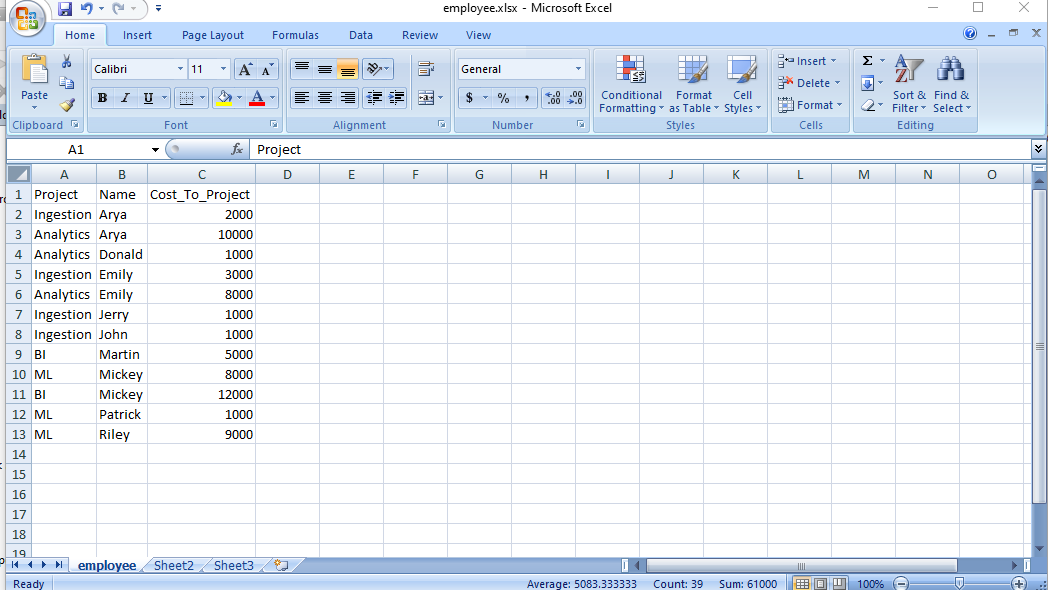
val df = spark.read.format("com.crealytics.spark.excel")
  .option("sheetName", "employee")
  .option("header", "true")
  .load("file:///C:/Hadoop/employee.xlsx")

scala> df.show
+---------+-------+---------------+
|  Project|   Name|Cost_To_Project|
+---------+-------+---------------+
|Ingestion|   Arya|           2000|
|Analytics|   Arya|          10000|
|Analytics| Donald|           1000|
|Ingestion|  Emily|           3000|
|Analytics|  Emily|           8000|
|Ingestion|  Jerry|           1000|
|Ingestion|   John|           1000|
|       BI| Martin|           5000|
|       ML| Mickey|           8000|
|       BI| Mickey|          12000|
|       ML|Patrick|           1000|
|       ML|  Riley|           9000|
+---------+-------+---------------+
Writing an Excel file in Spark
Let’s add an index column to the DataFrame and write the DataFrame back to Excel. Here is the code.
val dfidx = df.withColumn("index", monotonically_increasing_id)

dfidx.show
+---------+-------+---------------+-----+
|  Project|   Name|Cost_To_Project|index|
+---------+-------+---------------+-----+
|Ingestion|   Arya|           2000|    0|
|Analytics|   Arya|          10000|    1|
|Analytics| Donald|           1000|    2|
|Ingestion|  Emily|           3000|    3|
|Analytics|  Emily|           8000|    4|
|Ingestion|  Jerry|           1000|    5|
|Ingestion|   John|           1000|    6|
|       BI| Martin|           5000|    7|
|       ML| Mickey|           8000|    8|
|       BI| Mickey|          12000|    9|
|       ML|Patrick|           1000|   10|
|       ML|  Riley|           9000|   11|
+---------+-------+---------------+-----+


dfidx.write.format("com.crealytics.spark.excel").option("sheetName", "Daily").option("header", "true").mode("overwrite").save("file:///home/osboxes/employee_idx.xlsx")
Here is the excel file created by Spark.


Big Data In Real World
We are a group of Big Data engineers who are passionate about Big Data and related Big Data technologies. We have designed, developed, deployed and maintained Big Data applications ranging from batch to real time streaming big data platforms. We have seen a wide range of real world big data problems, implemented some innovative and complex (or simple, depending on how you look at it) solutions.